


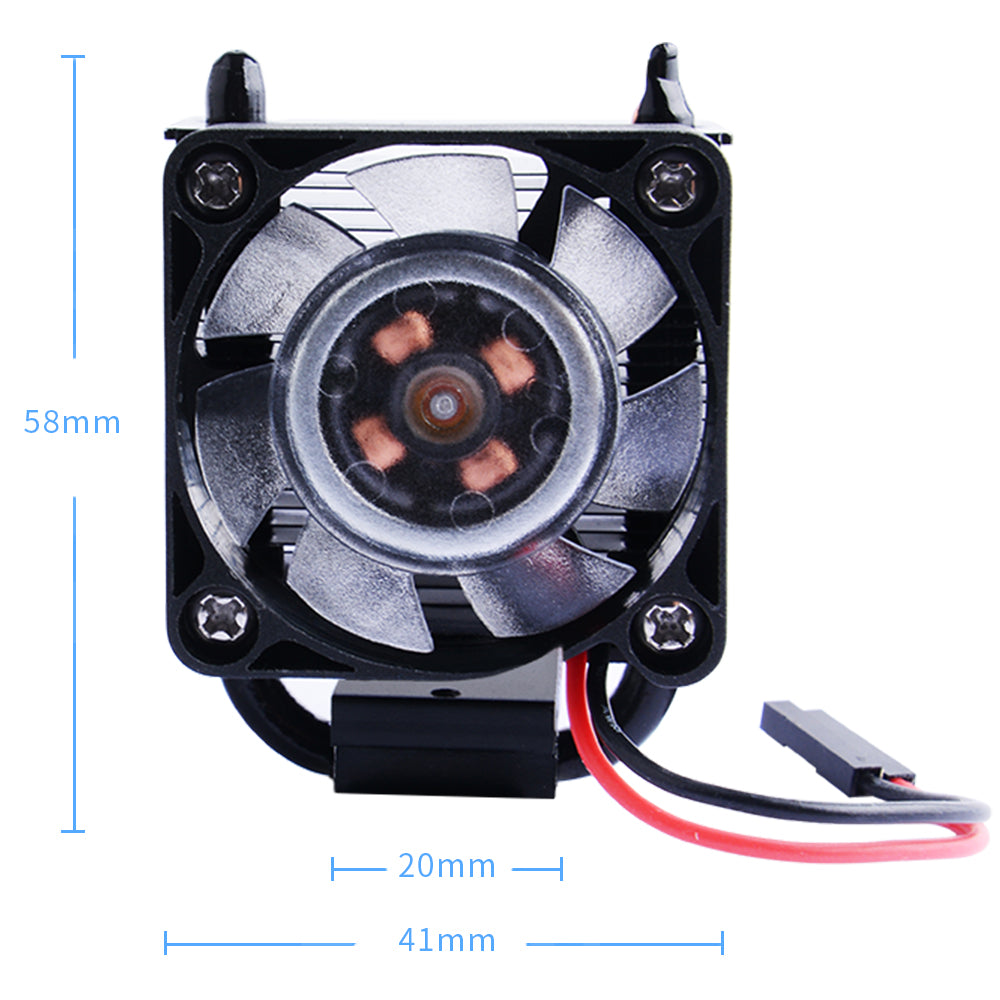
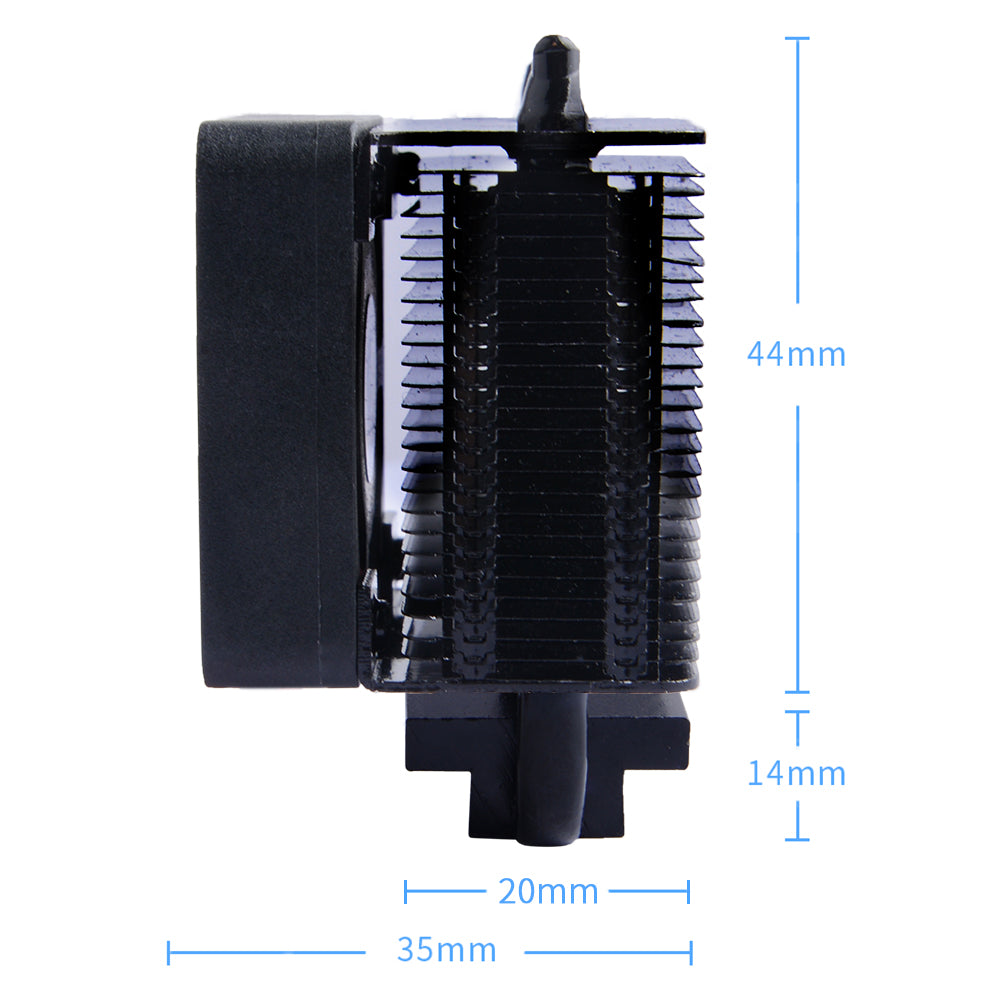
52Pi ICE-Tower CPU Cooling Fan V2.0 for Raspberry Pi 4 B / 3B+ (Black)

9 coupons
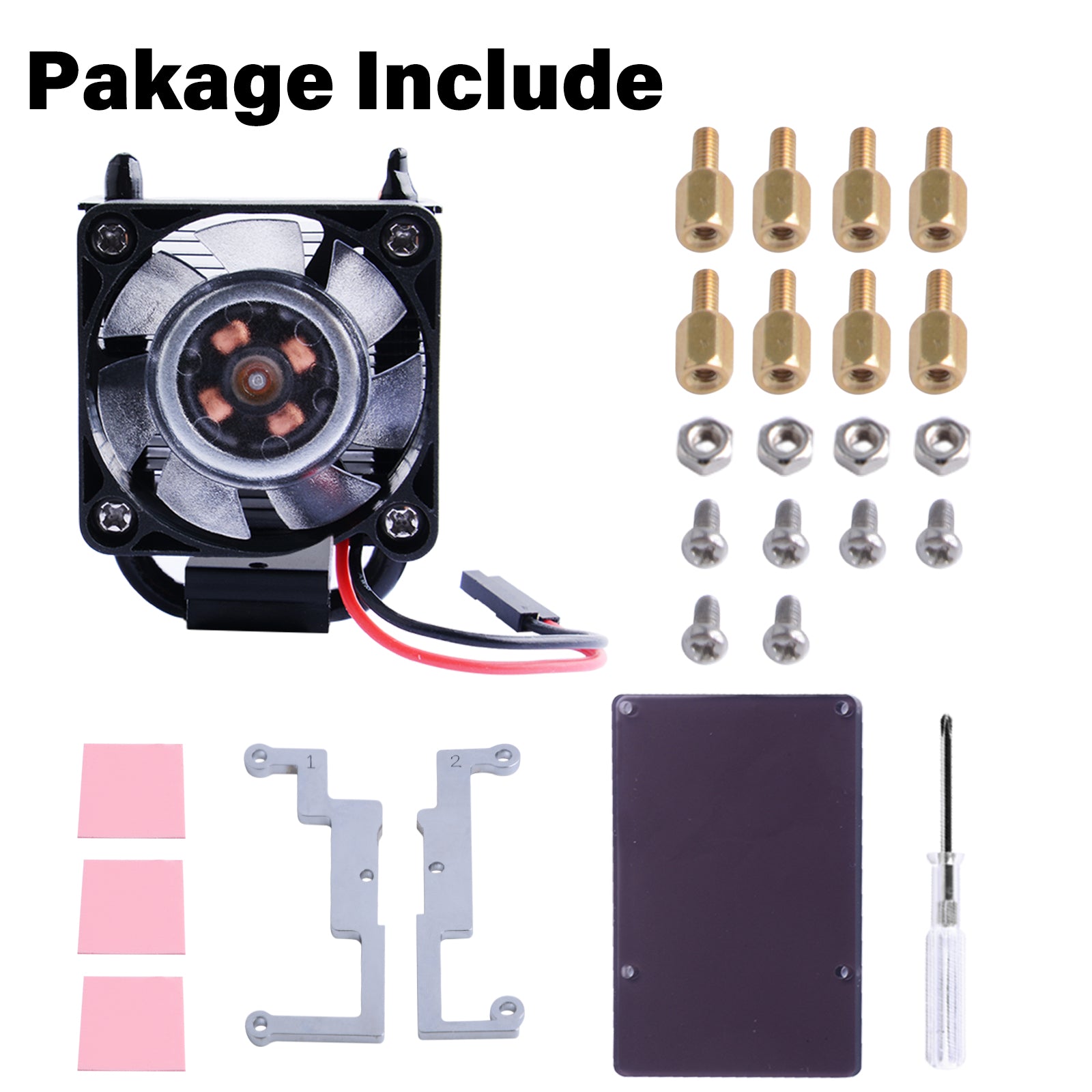
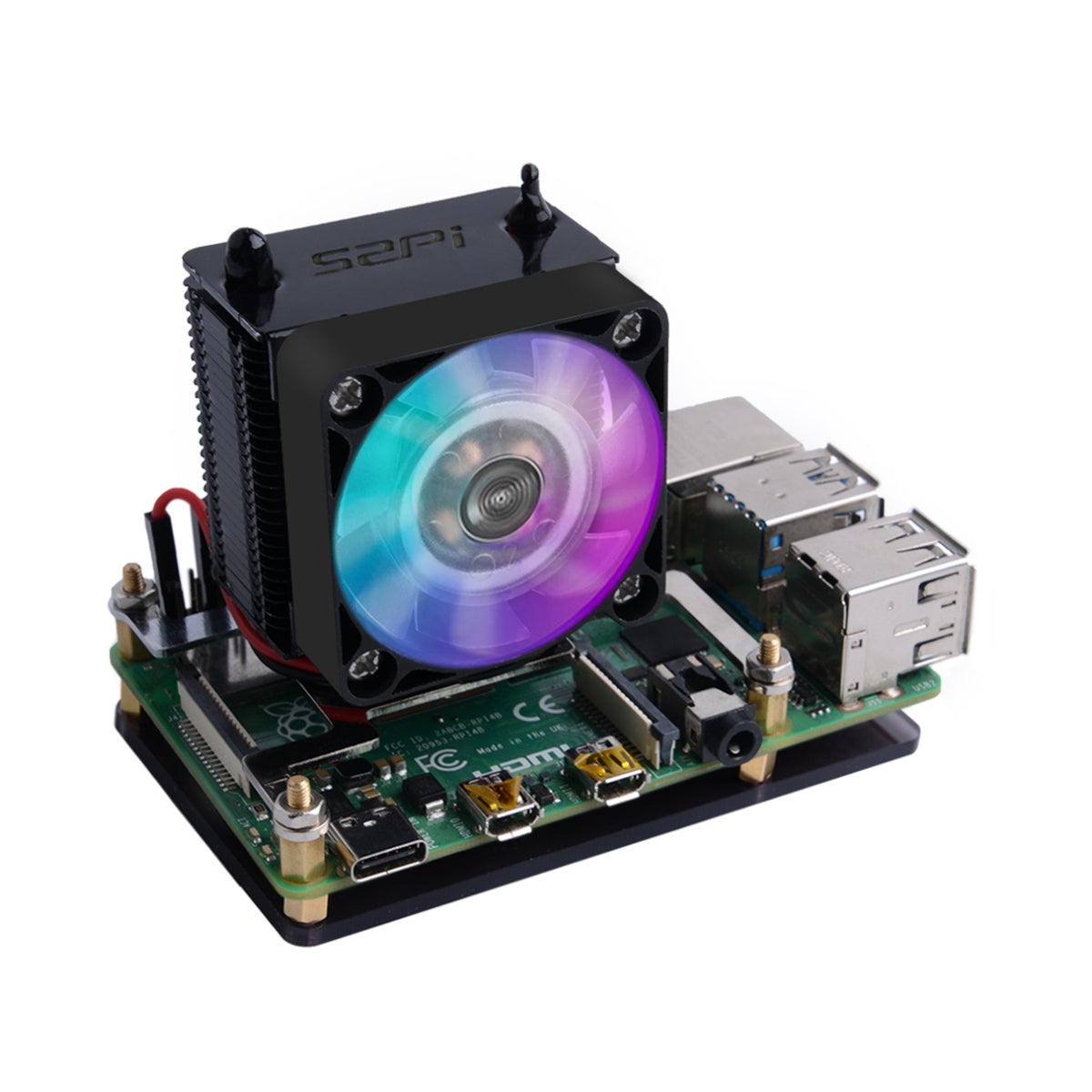
<h3 align="left"><span><strong data-spm-anchor-id="a2g0o.detail.1000023.i3.2e577387RaZ7vx">[Description]</strong></span></h3> <p><span>According to Moore's law, the design of high-speed and high-density printed circuit board (PCB) is becoming more and more complex.</span><span><br></span><span>Higher processing performance will generate more heat. </span><span><br></span><span>This super ICE Tower CPU Cooling Fan for Raspberry Pi is burned for solving heat dissipation problem! </span><span><br></span><span>Tower structure, 5mm copper tube, multi-layer heat sinks, 7 blades powerful fan, all the above combinations make this super radiator for Raspberry Pi.</span><span><br></span><span>In the case of overclocking, it can reduce the temperature of the Raspberry Pi from 80℃ to 40℃.</span><span><br></span><span>Best of all, this super cooling fan support both Raspberry Pi 3 and the new Raspberry Pi 4.</span><span><br></span><span>When the fan turns up, you will see 7 colors.</span></p> <p><br></p> <h3 align="left"><span><strong>[Features]</strong></span></h3> <div> <ul> <li> <p><span>DC 5V Power in (Can be powered by the Raspberry Pi)</span></p> </li> <li> <p><span>Ice Tower Structure</span></p> </li> <li> <p><span>5mm copper tube</span></p> </li> <li> <p><span>Super heat dissipation</span></p> </li> <li> <p><span>Rated power 0.4W @5V, 0.08A</span></p> </li> <li> <p><span>Super Cool fan background light (7 Colors)</span></p> </li> <li> <p><span>Easy to setup</span></p> </li> </ul> <p> </p> <h3><span><strong>[52Pi WiKi]</strong></span></h3> <p>It is recommended to use the Raspberry Pi official system, please refer to the wiki</p> <p><span style="color: rgb(43, 0, 255);"><a href="https://wiki.52pi.com/index.php?title=EP-0111" style="color: rgb(43, 0, 255);">EP-0111 - 52Pi Wiki</a></span></p> <p> </p> </div> <h3><span><strong>[Package Includes]</strong></span></h3> <p><span>Only the ice tower cooling fan bundle:</span></p> <p><span>Note: the power supply and Raspberry Pi board are not included!</span></p> <ul> <li> <p><span>1 x Ice Tower radiator and Fan</span></p> </li> <li> <p><span>1 x 4010 Black No Light Cooling Fan</span></p> </li> <li> <p><span>2 x Steel Mounting Fixer (Fit for Raspberry Pi 3B+)</span></p> </li> <li> <p><span>2 x Steel Mounting Fixer (Fit for Raspberry Pi 4B)</span></p> </li> <li> <p><span>2 x M2x4 Screws</span></p> </li> <li> <p><span>4 x M2.5x6 Copper sticks</span></p> </li> <li> <p><span>4 x M2.5 Nuts</span></p> </li> <li> <p><span>4 x M2.5x4 screws</span></p> </li> <li> <p><span>3 x Thermal Tape</span></p> </li> <li> <p><span>1 x Screw Driver</span></p> </li> <li> <p><span>1 x Acrylic Bracket</span></p> </li> </ul> <p> </p> <h3><strong><span class="mw-headline" id="How_to_assemble">[How to assemble]</span></strong></h3> <table> <tbody> <tr> <td> <div class="floatleft"><a href="https://wiki.52pi.com/index.php/File:Rpi3bthermaltape.png" class="image"><img alt="Rpi3bthermaltape.png" src="https://wiki.52pi.com/images/thumb/8/81/Rpi3bthermaltape.png/320px-Rpi3bthermaltape.png" width="320" height="189" srcset="/images/thumb/8/81/Rpi3bthermaltape.png/480px-Rpi3bthermaltape.png 1.5x, /images/thumb/8/81/Rpi3bthermaltape.png/640px-Rpi3bthermaltape.png 2x"></a></div> </td> <td> <div class="floatnone"><a href="https://wiki.52pi.com/index.php/File:Icetowerassemble05.jpg" class="image"><img alt="Icetowerassemble05.jpg" src="https://wiki.52pi.com/images/thumb/6/67/Icetowerassemble05.jpg/320px-Icetowerassemble05.jpg" width="320" height="320" srcset="/images/thumb/6/67/Icetowerassemble05.jpg/480px-Icetowerassemble05.jpg 1.5x, /images/thumb/6/67/Icetowerassemble05.jpg/640px-Icetowerassemble05.jpg 2x"></a></div> </td> <td> <div class="floatnone"><a href="https://wiki.52pi.com/index.php/File:Icetowerassemble03.jpg" class="image"><img alt="Icetowerassemble03.jpg" src="https://wiki.52pi.com/images/thumb/d/dd/Icetowerassemble03.jpg/320px-Icetowerassemble03.jpg" width="320" height="320" srcset="/images/thumb/d/dd/Icetowerassemble03.jpg/480px-Icetowerassemble03.jpg 1.5x, /images/thumb/d/dd/Icetowerassemble03.jpg/640px-Icetowerassemble03.jpg 2x"></a></div> </td> </tr> </tbody> </table> <table> <tbody> <tr> <td> <div class="floatleft"><a href="https://wiki.52pi.com/index.php/File:Icetowerassemble02.jpg" class="image"><img alt="Icetowerassemble02.jpg" src="https://wiki.52pi.com/images/thumb/1/1d/Icetowerassemble02.jpg/320px-Icetowerassemble02.jpg" width="320" height="320" srcset="/images/thumb/1/1d/Icetowerassemble02.jpg/480px-Icetowerassemble02.jpg 1.5x, /images/thumb/1/1d/Icetowerassemble02.jpg/640px-Icetowerassemble02.jpg 2x"></a></div> </td> <td> <div class="floatnone"><a href="https://wiki.52pi.com/index.php/File:Icetowerassemble01.jpg" class="image"><img alt="Icetowerassemble01.jpg" src="https://wiki.52pi.com/images/thumb/e/e4/Icetowerassemble01.jpg/320px-Icetowerassemble01.jpg" width="320" height="320" srcset="/images/thumb/e/e4/Icetowerassemble01.jpg/480px-Icetowerassemble01.jpg 1.5x, /images/thumb/e/e4/Icetowerassemble01.jpg/640px-Icetowerassemble01.jpg 2x"></a></div> </td> <td> <div class="floatnone"><a href="https://wiki.52pi.com/index.php/File:%E5%A1%94%E5%BC%8F%E9%A3%8E%E6%89%87-%E7%B2%BE-3.jpg" class="image"><img alt="塔式风扇-精-3.jpg" src="https://wiki.52pi.com/images/thumb/1/10/%E5%A1%94%E5%BC%8F%E9%A3%8E%E6%89%87-%E7%B2%BE-3.jpg/320px-%E5%A1%94%E5%BC%8F%E9%A3%8E%E6%89%87-%E7%B2%BE-3.jpg" width="320" height="320" srcset="/images/thumb/1/10/%E5%A1%94%E5%BC%8F%E9%A3%8E%E6%89%87-%E7%B2%BE-3.jpg/480px-%E5%A1%94%E5%BC%8F%E9%A3%8E%E6%89%87-%E7%B2%BE-3.jpg 1.5x, /images/thumb/1/10/%E5%A1%94%E5%BC%8F%E9%A3%8E%E6%89%87-%E7%B2%BE-3.jpg/640px-%E5%A1%94%E5%BC%8F%E9%A3%8E%E6%89%87-%E7%B2%BE-3.jpg 2x"></a></div> </td> </tr> </tbody> </table> <h3> <span id="Raspberry_Pi_3B+_2"></span><strong><span class="mw-headline" id="Raspberry_Pi_3B.2B_2">Raspberry Pi 3B+</span> </strong> </h3> <ul> <li>1. Fixed the steel mounting fixer to radiator's heat dissipation cube with M2.0 screws</li> <li>2. Fixed the steel mounting fixer to Raspberry Pi 3B+’s mounting hole with M2.5 copper stick, and please make sure the heat dissipation is contact to CPU shield properly.</li> <li>3. Fixed the copper stick to Raspberry Pi with M2.5 nuts.</li> <li>4. Connect the red wire to GPIO 5V pin and black wire to GPIO GND pin.</li> </ul> <h3><strong><span class="mw-headline" id="Raspberry_Pi_4B_2">Raspberry Pi 4B</span></strong></h3> <ul> <li>1. Fixed the steel mounting fixer to radiator's heat dissipation cube with M2.0 screws</li> <li>2. Fixed the steel mounting fixer to Raspberry Pi 4B’s mounting hole with M2.5 copper stick, and please make sure the heat dissipation is contact to CPU shield properly.</li> <li>3. Fixed the copper stick to Raspberry Pi with M2.5 nuts.</li> <li>4. Connect the red wire to GPIO 5V pin and black wire to GPIO GND pin.</li> </ul> <p> </p> <h3><strong><span class="mw-headline" id="Package_Include">[Package Include]</span></strong></h3> <ul> <li>1 x Ice Tower radiator and Fan</li> <li>2 x Steel Mounting brackets</li> <li>8 x M2.5x6 Copper sticks</li> <li>4 x M2.5 Nuts</li> <li>6 x M2.5x4 screws</li> <li>3 x Thermal Tape</li> <li>1 x Screw Driver</li> <li>1 x Protective Acrylic Panel</li> </ul> <div class="floatleft"><img alt="" src="https://cdn.shopify.com/s/files/1/0585/9878/5176/files/f62986e907de63f797a2e952f2eec868_600x600.jpg?v=1676442549" style="display: block; margin-left: auto; margin-right: auto;"></div> <p><br></p> <pre><strong>PS: Product does not contain thermal silicone grease, but if you have thermal silicone the dispassion effect will be better.</strong></pre> <h3> <strong><span class="mw-headline"></span></strong><br> </h3> <h3><strong><span class="mw-headline" id="Customer_Review">Customer Review</span></strong></h3> <ul> <li>YOUTUBE URL: <ul> <li>[<span> </span><span style="color: rgb(43, 0, 255);"><a rel="nofollow" class="external free" href="https://youtu.be/9lqkllZiXN4" style="color: rgb(43, 0, 255);">https://youtu.be/9lqkllZiXN4</a></span><span> </span>]</li> <li>[<span> </span><span style="color: rgb(43, 0, 255);"><a rel="nofollow" class="external free" href="https://www.youtube.com/watch?v=3Eiq7k7Sekc" style="color: rgb(43, 0, 255);">https://www.youtube.com/watch?v=3Eiq7k7Sekc</a></span><span> </span>]</li> <li>[<span> </span><span style="color: rgb(43, 0, 255);"><a rel="nofollow" class="external free" href="https://www.youtube.com/watch?v=Rs1SnojIyDk" style="color: rgb(43, 0, 255);">https://www.youtube.com/watch?v=Rs1SnojIyDk</a></span><span> </span>]</li> <li>[<span> </span><span style="color: rgb(43, 0, 255);"><a rel="nofollow" class="external free" href="https://www.youtube.com/watch?v=FciNotr6d6g" style="color: rgb(43, 0, 255);">https://www.youtube.com/watch?v=FciNotr6d6g</a></span><span> </span>]</li> <li>[<span> </span><span style="color: rgb(43, 0, 255);"><a rel="nofollow" class="external free" href="https://www.youtube.com/watch?v=hWvd7foeICg" style="color: rgb(43, 0, 255);">https://www.youtube.com/watch?v=hWvd7foeICg</a></span><span> </span>]</li> <li>[<span> </span><span style="color: rgb(43, 0, 255);"><a rel="nofollow" class="external free" href="https://www.youtube.com/watch?v=e6mWImsF9iI" style="color: rgb(43, 0, 255);">https://www.youtube.com/watch?v=e6mWImsF9iI</a></span><span> </span>]</li> <li>[<span> </span><span style="color: rgb(43, 0, 255);"><a rel="nofollow" class="external free" href="https://www.youtube.com/watch?v=wn0-w1M9puk" style="color: rgb(43, 0, 255);">https://www.youtube.com/watch?v=wn0-w1M9puk</a></span><span> </span>]</li> <li>[<span> </span><span style="color: rgb(43, 0, 255);"><a rel="nofollow" class="external free" href="https://www.youtube.com/watch?v=7YRnQ09fGWI" style="color: rgb(43, 0, 255);">https://www.youtube.com/watch?v=7YRnQ09fGWI</a></span><span> </span>]</li> <li>[<span> </span><span style="color: rgb(43, 0, 255);"><a rel="nofollow" class="external free" href="https://www.youtube.com/watch?v=OiRD7WWvTQg" style="color: rgb(43, 0, 255);">https://www.youtube.com/watch?v=OiRD7WWvTQg</a></span><span> </span>]</li> <li>[<span> </span><span style="color: rgb(43, 0, 255);"><a rel="nofollow" class="external free" href="https://www.youtube.com/watch?v=lD7t-IGLjVM" style="color: rgb(43, 0, 255);">https://www.youtube.com/watch?v=lD7t-IGLjVM</a></span><span> </span>]</li> <li>[<span> </span><span style="color: rgb(43, 0, 255);"><a rel="nofollow" class="external free" href="https://www.youtube.com/watch?v=tie6r5ymUug" style="color: rgb(43, 0, 255);">https://www.youtube.com/watch?v=tie6r5ymUug</a></span><span> </span>]</li> </ul> </li> <li>Instructable: <ul> <li>[<span> </span><a rel="nofollow" class="external free" href="https://www.instructables.com/DIY-Raspberry-Pi-Desktop-Case-With-Stats-Display/"><span style="color: rgb(43, 0, 255);">https://www.instructables.com/DIY-Raspberry-Pi-Desktop-Case-With-Stats-Display/</span> <span style="color: rgb(0, 0, 0);">]</span></a> </li> </ul> </li> </ul>
Save on 52Pi ICE-Tower CPU Cooling Fan V2.0 for Raspberry Pi 4 B / 3B+ (Black) with a 52Pi Store coupon
Checkmate is a savings app with over one million users that have saved $$$ on brands like 52Pi Store.
The Checkmate extension automatically applies 52Pi Store discount codes, 52Pi Store coupons and more to give you discounts on products like 52Pi ICE-Tower CPU Cooling Fan V2.0 for Raspberry Pi 4 B / 3B+ (Black).
Top 52Pi Store discount codes
3 people have used this 52Pi Store discount code
Last used 11 months ago
2 people have used this 52Pi Store discount code
Last used about 1 year ago
1 person has used this 52Pi Store coupon
Last used 11 months ago
See all codes

Similar items


